On your device
Local by default.
Your record is stored on the device you wrote it on. The app works without a connection.
A private work journal
Worth Noting keeps a private record of what you did, on your device, with no Worth Noting account and no employer attached. It comes with you when the job changes.
On your device · No account · No feed · Free to start
What actually happens
The evidence of your work is scattered across systems you don't own. Ticket comments. Chat history. Docs on a company drive. The feedback someone sent you in a thread. Even your own past performance reviews.
None of it feels inaccessible while you're there. Then the work account closes, and years of context can disappear with it.
What you did shouldn't depend on remembering it after the evidence is gone.
What stays with you
“Untangled the reporting bug we'd been chasing for months.”
Kept outside the systems where the work happened.
What private means here
Privacy claims are easy to make. So here is what Worth Noting actually does, rather than a vague promise about being "private".
On your device
Your record is stored on the device you wrote it on. The app works without a connection.
No account
There's no Worth Noting login or account database holding your record.
No audience
Nothing you write is shared anywhere. There's no social layer to opt out of.
Your iCloud
If you turn them on, your record is stored in your own iCloud account. It doesn't pass through a Worth Noting server.
Your record stays on your device, and in your own iCloud if you turn on sync or automatic backup. It doesn't come to us, and we don't collect analytics about how you use the app. Apple handles App Store purchases, and RevenueCat helps Worth Noting recognize Pro. The Privacy Policy explains the limited information those services process.
Read the Privacy PolicyNo integrations, on purpose
Worth Noting doesn't read your calendar, inbox, chat, or work software to build your record for you. That's less automatic, deliberately.
A personal record is most useful when it doesn't depend on continued access to the systems where the work happened. Work accounts close. Tools change. Permissions disappear.
So Worth Noting asks you to write the line yourself. It takes a few seconds, keeps the record in your own words, and leaves you with something that isn't tied to your work account.
What the calendar keeps
“Q3 planning,
Thursday, 2pm”
What you keep
“Talked the room out of a plan that would have cost us a month.”
The line to draw
A personal record can hold your contribution, outcomes, lessons, and details you're allowed to keep. It shouldn't become a copy of customer data, confidential documents, proprietary material, or anything an agreement or policy says you shouldn't retain.
That's practical as well as responsible. The record should help you talk about what you did without requiring you to carry the company's files with you.
Before you leave a job
Not about distrust, and not about taking company material with you. Just the details of your own work that are easy to recall now and much harder later.
That last one matters too. A job change can make the ending feel larger than everything that came before it. A record that holds more than the resume version gives you something fuller to look back on.
Still yours to use
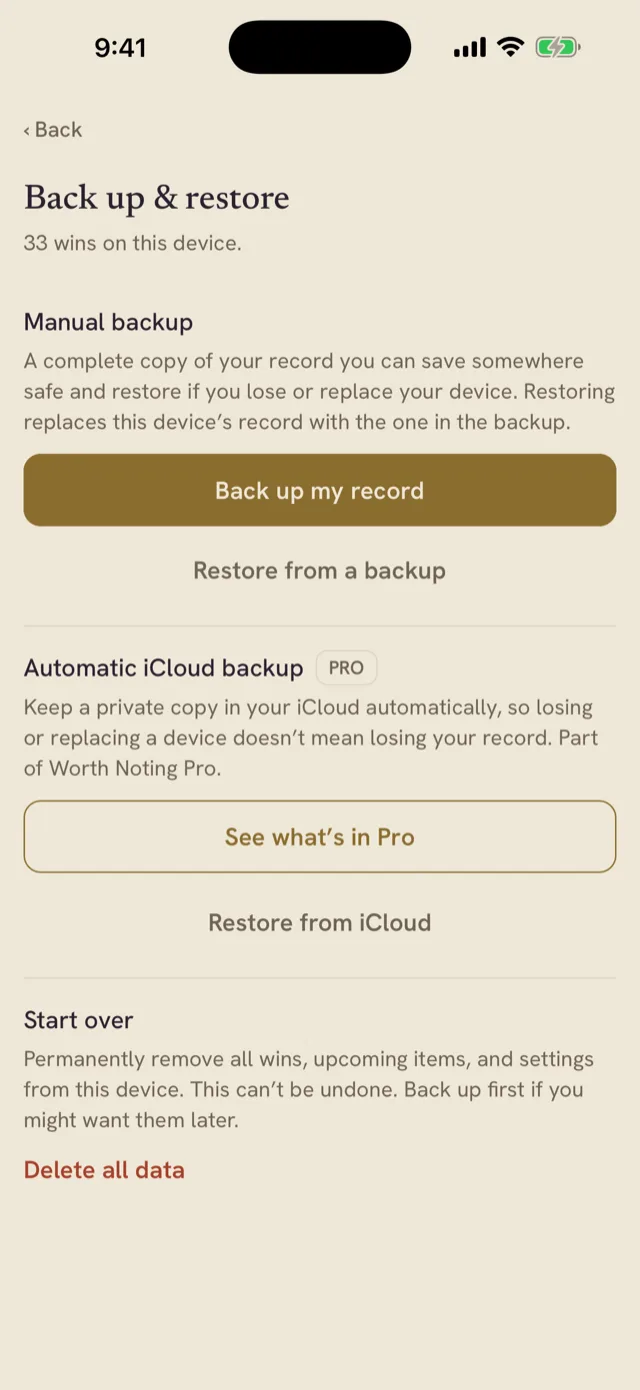
A record you can't get out of an app is just a different kind of lock-in. Export your record as a PDF, or make a backup of your record and photos that you can keep somewhere safe. PDF export, manual backup, and restore are free.
If Pro ends, nothing you've already written is taken away or hidden.
Worth Noting for iPhone and iPad
A line is enough to begin. The record is yours from the first one.

On your device · No account · Free to start